
Compare
AI Calorie vs Lose It!
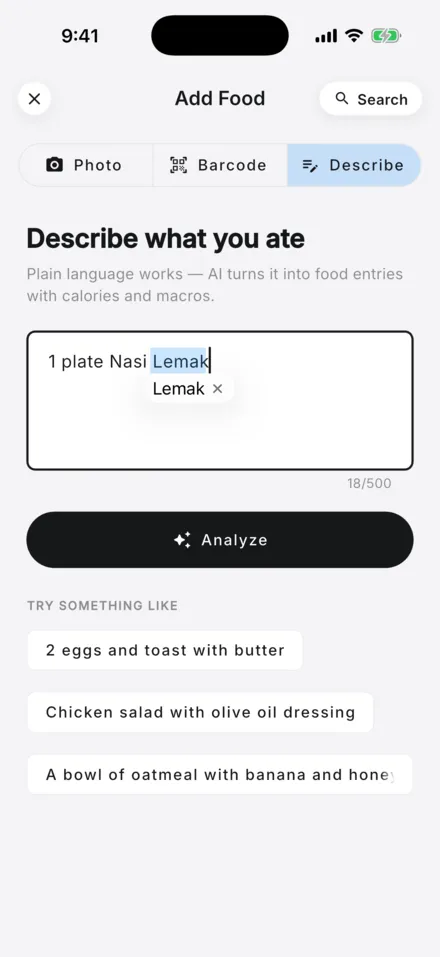
Lose It! is an established calorie counting app with Basic and Premium versions, a Smart Camera that scans barcodes or food, and exercise sync. The pages we checked do not show its prices. AI Calorie is newer, free to start with daily limits, and built around logging from a photo or a sentence.
Get it on Google Play → Join the iPhone waitlist Available on Android. iPhone coming soon. Free to start.
We make AI Calorie, so this page is not neutral. Facts about Lose It! come from its own website, are dated, and may be out of date by the time you read this. Lose It! is a trademark of its owner. AI Calorie is not affiliated with or endorsed by them.

AI Calorie vs Lose It! at a glance
| AI Calorie | Lose It! | |
|---|---|---|
| Free plan | Free plan with daily limits: 1 photo scan, 5 text logs, 2 insights | A free sign-up and a "Lose It! Basic" version are listed [1] |
| Paid price | On Google Play in Malaysia: RM9.90 per week, RM29.90 per month, RM199 per year | Not shown on the pages we checked [1]; see its store listing |
| How you log | Photo, text description or barcode scan | Smart Camera for barcodes or the food itself, barcode scanner, food search [1] |
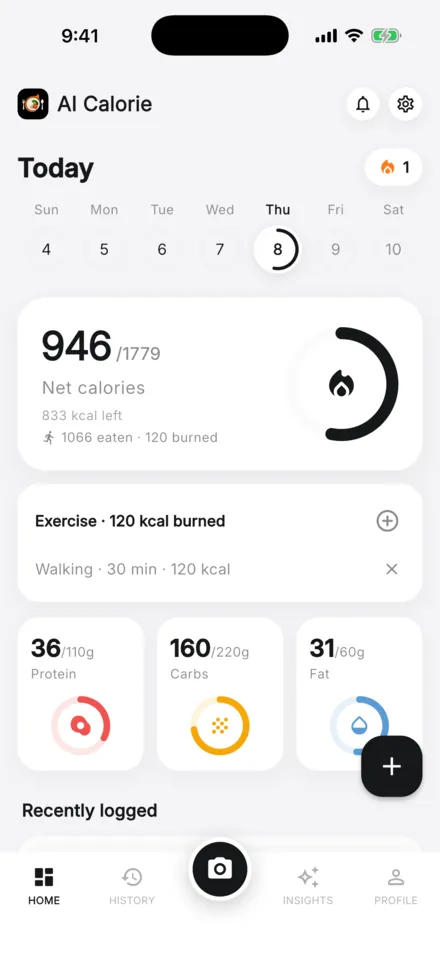
| Macro tracking | Yes, on the free plan | Listed, with personalized macronutrient goals; the plan that includes it is not stated [1] |
| Exercise | Log exercise by hand | Log in the app, or sync Apple Health and Google Fit [1] |
| Other features | Focused on logging and daily goals; no meal plans | Water tracking, intermittent fasting, community groups, meal and exercise planning [1] |
| Platforms | Android on Google Play; iPhone coming soon | Mobile apps and a web log-in, per its site [1] |
Is Lose It free?
Lose It! lists a Basic and a Premium version on its How It Works page, and its homepage invites you to sign up for free. The pages we checked did not show Premium prices or which features sit in each tier, so check the app store listing before you subscribe (checked 31 October 2026).
Does Lose It have a photo calorie counter?
Yes. Lose It! describes a Smart Camera that lets you scan package barcodes or photograph the food itself to help you log it. AI Calorie also logs from a photo, a text description or a barcode, with 1 photo scan a day on the free plan and higher limits with Pro.
Lose It or AI Calorie: which is better?
Neither wins for everyone, and we make AI Calorie, so we are not neutral. Lose It! is long established, with exercise sync, fasting and community groups listed on its site. AI Calorie is newer and focused on quick photo or text logging. Try each free plan and see which one you keep using.
Does Lose It count macros?
Lose It! lists macro tracking, where you set personalized macronutrient goals for protein, carbs and more. AI Calorie shows calories, protein, carbs and fat for every entry, and macro tracking is included on the free plan. Which Lose It! plan includes macros is not stated on the pages we checked.
See AI Calorie as a macro tracker.
Is there a Lose It alternative with AI photo logging?
AI Calorie is one option: photograph a meal or describe it, get estimated calories, protein, carbs and fat, then review the result before saving. It is free to start with daily limits, on Android now, and iPhone is coming soon. Lose It! also has a Smart Camera, so compare both.
How the AI calorie counter works
Reviews and ratings
Lose It! shows member stories and store ratings on its own site. We do not repeat them because we cannot verify them, and the figures change. Read the current App Store and Google Play reviews for both apps before you decide.
Sources
- Lose It!, homepage and How It Works, checked 31 October 2026.
Related: AI Calorie vs Cronometer · AI Calorie vs Cal AI · MyFitnessPal alternative · pricing

AI Calorie gives general nutrition information and AI-generated estimates. It is not medical advice. See medical review and our Terms of Use.